A HUD made of blocks
After a week of clocks, the HUD got one look: soft cream blocks, a ring clock with the work hours on it, alerts as tags and cards for buildings and people.
The clock went through more versions this week than anything else in the game. First a bar of the day’s hours across the top. Then a brass pocket watch, which read as loose pixels. Then a solid bar of 24 hour blocks with a brass handle for the work hours. Then a wooden clock panel that, when I looked at it next to Timberborn, came far too close to theirs. Then a walnut punch clock with a card for the work hours. Each one looked fine alone and odd next to the rest of the screen, because the rest of the screen had no style at all.
So this time I designed the whole HUD in one go, on a style board first, and then built it. Everything is now the same kind of block: soft cream panels with rounded corners, a darker rim and a little drop under them, like the voxel world but flat. Text is in two friendly round fonts, one for headings and one for the rest.
Top right is the day in its own small panel, and under it the clock: a ring of 24 wedges with midnight at the top, coloured by the part of the day (night blue, morning amber, work rose, evening green), and a single hand. There are no digits for the time; the hand is enough. The work hours are a gold band on the ring that you drag to make the shift longer or shorter, with one line under it saying what you set, like eight hours from 08:00 to 16:00. The speeds are plain toggle buttons: pause, 1x, 2x and 3x.
Under the clock the alerts stack up as tags, each with a coloured badge, a short title and a hint about what to do: three people without work, so build a workplace; a lamp knocked over, and a hauler will put it back. Top left is the town’s stock in one strip, every item with a small picture rendered from its own model, and next to it the number of people and the knowledge. The build menu at the bottom shows each building’s model above its name, in rows, so a town that has found everything still fits.
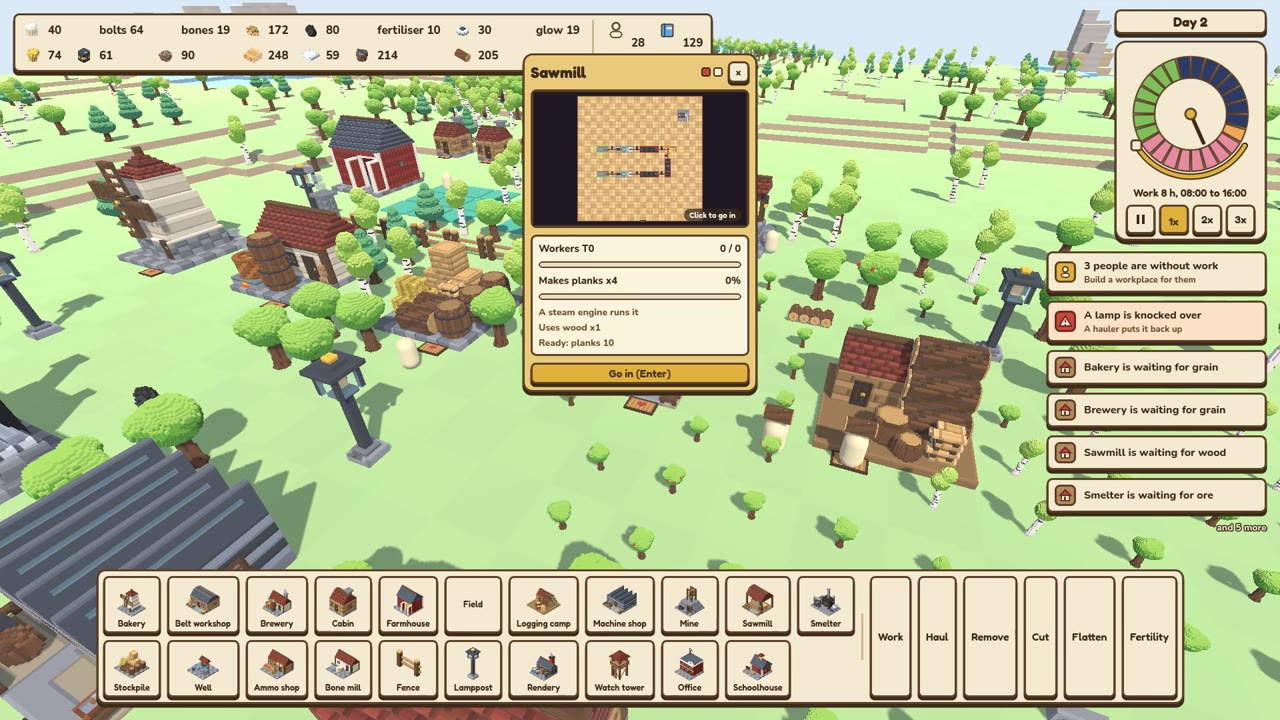
Clicking a building opens its card above it. A factory shows its floor live from above, and clicking that picture, or pressing Enter, takes you inside. Under it are the workers, what it makes with a bar for the batch, and what it holds. Clicking a person opens theirs, with their name, job, home and a bar for each need. The debug text that used to sit on top of all this is now a see-through panel behind Ctrl+F3, and only in development builds.